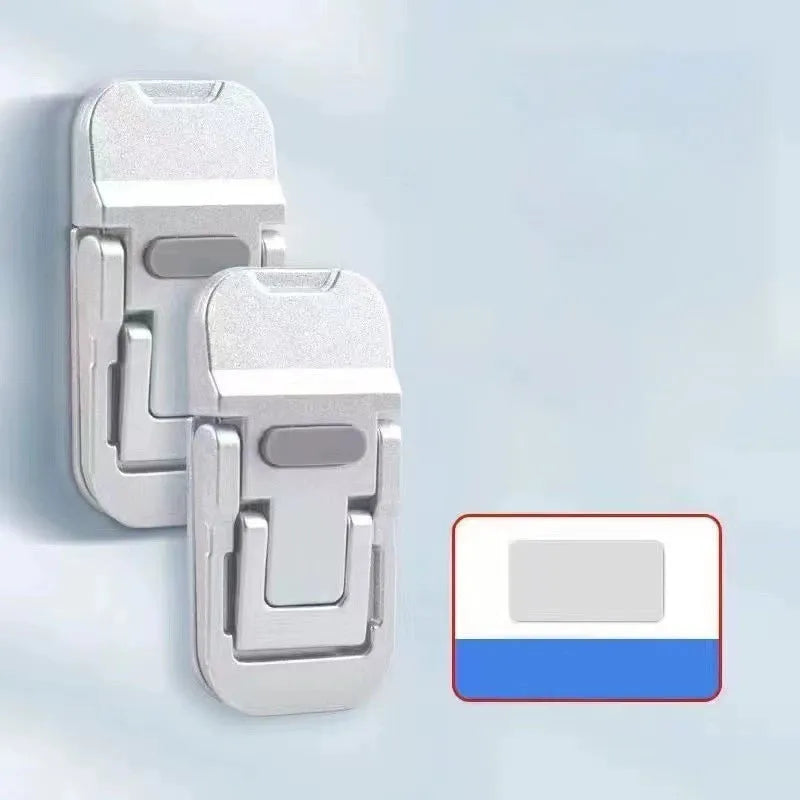
The Mini Laptop Stand That Lives on Your Lid
Reviewed by the workspace team
A stand that sticks to the back of your laptop, folds flat when you don't need it, and lifts the screen to eye level the moment you open the lid. Better posture, cooler device, no bulk on the desk.

The laptop slowly wears you down
Think about the last long stretch at the laptop. An hour in, the neck starts to ache, the shoulders creep up toward the ears, and you find yourself chin-forward squinting at a screen that sits three inches below your eyes. By the end of the day the tiredness is in your upper back, not your fingers. It is not the work that drains you — it is the angle. The screen was built to sit flat on a desk, and your body was not built to look down at a desk all day.
It is not only comfort. A laptop flat on the desk pulls cool air in through the bottom and pushes hot air right back into itself, so it runs warmer than it should and slows down when you need it most. And the "fixes" are all annoying in their own way. A big wedge stand takes over the desk and never leaves the house. A stack of books works once, then the book is gone and the angle is wrong again. A fancy aluminum riser is great at home and impossible to carry. Every option asks you to choose between comfort, cooling, or portability — and most days you choose none of them.
The middle answer is a stand that is part of the laptop, not a thing on the desk. Something that sticks to the lid, folds away to nothing, and pops into the right angle the second you open the screen — so the better posture and the cooler device show up without you setting anything up. That is what this little pair is built to do.
What the ordinary fixes get wrong
A bulky wedge gives you the angle but eats the desk and never travels. Books give a rough angle and vanish when you need them. A heavy riser is comfortable at home and dead weight in a bag. None of them are on the laptop when you open it — they are separate objects you have to remember, place, and pack. This stand removes that step: it lives on the lid, so the elevation is already there the moment the screen is open, and it folds flat before the lid closes. Comfort and cooling without a thing on the desk or in the bag.

What this little stand actually is
It is a pair of ultra-thin stands that stick to the back of your laptop lid with adhesive and fold flat against the case when not in use. Open the lid and they swing out to lift the rear of the laptop to a comfortable viewing height — the "golden angle" that brings the screen up to your eyes instead of your chin. Two of them come in the pack, placed symmetrically toward the rear corners, so the laptop sits level and stable rather than teetering on one edge.
The body is zinc alloy, not flimsy plastic, with anti-slip silicone pads that hold the laptop without scratching it or letting it slide. Because the stands are part of the lid, the cooling gap they create is always there — air moves under the device instead of recycling its own heat. And when you close up, they fold flat and add no bulk to the sleeve. It is the rare laptop accessory that improves the device and then gets out of the way.

Five things that make it worth using
1Invisible until you open it
Sticks to the back of the lid and folds flat against the case, so it adds nothing to the desk and nothing to the bag. Open the laptop and it is already there — no separate stand to place, pack, or forget.
2Ergonomic viewing angle
Lifts the screen to eye level and eases the chin-forward hunch, so neck and shoulder strain drop off over a long day. Two height levels let you tune the angle to your chair and your eyes.
3Airflow that actually cools
The lift opens a ventilation space underneath the laptop, so air moves through instead of recycling heat. The device runs cooler and holds its pace through the work that used to make it throttle.
4Sturdy, no wobble
A zinc alloy body with anti-slip silicone pads keeps the laptop planted and steady while you type. It feels solid, not like a flimsy clip-on, and it does not slide when you shift the laptop.
5Pocket-sized, two in a pack
Ultra-thin and light, they fold flat and slip into any sleeve unnoticed. The pack of two lets you set up both rear corners for a level, stable lift — one for each side of the lid.

Who tends to use it
This is for anyone who lives at a laptop for more than an hour at a time. Remote workers and students who feel the neck tighten by mid-afternoon. People who type on the couch, the kitchen table, the library — anywhere the desk is whatever is in front of them. Travellers who want the comfort of a riser without carrying one. Anyone whose laptop runs warm during a call or a render and could use the air moving underneath. Really, it is for the person who opens the lid every day and would rather not pay for it in posture by evening.
It also suits the minimalist desk — the people who want the benefit of a stand without another object cluttering the workspace. Because the stands live on the lid, the desk stays clear and the angle travels with the computer. Set it once, and every open lid is already at the right height.
How to use it
Start with a clean, dry lid. Peel the adhesive and place the two stands symmetrically toward the rear corners of the laptop — that keeps the lift level and stable. Press firmly so the bond sets, then open the lid and swing the stands out to the angle you want. The screen rises to eye level and the gap underneath opens up for airflow.
When you close up, fold the stands flat against the lid — they add no bulk to the sleeve. The adhesive holds but removes without residue if you ever reposition, though it is best left in place to keep its strength. Two minutes of setup, then every work session starts at the right height.
Add to Cart
What customers are saying
A
Anna W.
★★★★★
· Verified Buyer
Neck stopped aching by the end of the week. They stick to the lid and I forget they're there until I open it — already at eye level. Two of them keep it perfectly level.
D
Diego M.
★★★★★
· Verified Buyer
My laptop used to run hot on video calls. The gap underneath actually helped — fans calm down sooner. Zinc body feels solid, not cheap, and it folds flat with no bulk in the sleeve.
L
Lena K.
★★★★★
· Verified Buyer
Took them travelling and the stand was already on the lid — no separate riser to pack. Set both corners and the laptop sits steady, no wobble while typing on the train table.
P
Peter S.
★★★★★
· Verified Buyer
Adhesive is strong but came off clean when I moved it once — no residue on the lid. Two height levels is a nice touch, I use the higher one with my standing desk.
Questions people ask
Will it damage the laptop?+
No — the adhesive bonds to the lid and removes without residue if you ever reposition it. The silicone pads protect the laptop surface and keep it from sliding, so there is no scratching in normal use.
Does it really help with cooling?+
Yes — lifting the rear of the laptop opens a ventilation space underneath, so air moves through instead of recycling the device's own heat. It helps the laptop hold its pace through longer calls and renders.
How many come in the pack?+
Two stands per pack. Place them symmetrically toward the rear corners of the lid so the lift is level and the laptop stays stable instead of resting on one edge.
Is it adjustable?+
It has two height levels, so you can tune the screen angle to your chair and your eyes. Swing the stands out to the level that brings the top of the screen to eye level.
Does it add bulk when closed?+
No — the stands are ultra-thin and fold flat against the lid, so they slip into any sleeve or backpack without adding noticeable weight or bulk. They are part of the laptop, not a thing in the bag.
Which colours are available?+
It comes in silver and black, so you can match the stands to your laptop. Both colours are in the same two-pack format.
This product vs ordinary options
| Aspect |
This Product |
Ordinary |
| Portability |
Lives on the lid, folds flat |
Bulky wedge, never travels |
| Posture |
Eye-level angle, 2 levels |
Screen flat, chin-forward hunch |
| Cooling |
Lift opens airflow underneath |
Flat base, recycles heat |
| Stability |
Zinc alloy, anti-slip pads |
Books slide, riser stays home |
| Desk space |
Nothing on the desk |
Stand occupies the workspace |
Specifications
| Specifications |
Details |
| Material |
Zinc Alloy |
| Adjustment |
2 Levels |
| Quantity |
2PCS Laptop Stand |
| Mounting |
Adhesive, removable without residue |
| Colours |
Silver, Black |
| Best For |
Home, office, travel, ergonomics, cooling |
| Package Includes |
2PCS Mini Foldable Laptop Stand |
Add to Cart
Every product is inspected before dispatch. Tracked delivery on every order, with a 30-day return policy if the stand does not feel right on your laptop.